INTRO | GAMEPACK | FIRMWARE |  ORDER
ilo musi 8 supports firmware update via TF card.
Latest Firmware
The latest firmware is v1.0 released on 2026-10-01. You can download it here: ILOMUSI8.BIN
Changelog:
- v1.0 20261001 - Initial release
Checking Firmware Version
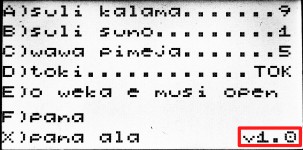
- Power on ilo musi 8
- Press the button D
- Check the version on the bottom-right corner
Firmware Update Method


- Power off ilo musi 8
- Download the latest firmware
- Put the latest firmware file "ILOMUSI8.BIN" into the root directory of the TF card. Do not change its filename.
- Insert the TF card into your ilo musi 8 unit
- Power on ilo musi 8
- Wait for the update to be performed
- Check firmware version after the update's completed
Developed with love by: Sadale